KWIKSET 998010-004 Halo Select Touchscreen Apple Keys 883351908931 Taptounlock
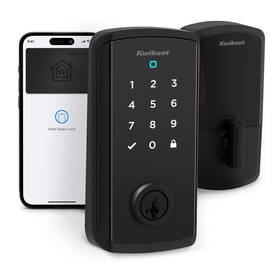
( Brand: Kwikset ), ( Manufacturer Part Number: 998010-004 ), ( Part Type: Key ), ( Model Name: Halo Select Plus ), ( Control Method: Touch ), ( Finish Type: Powder Coated ), ( Connectivity Protocol: Matter, Wi-fi ), ( Recommended Uses For Product: Home ), ( Style: Transitional ), ( Color: Matte Black ), ( Controller Type: Amazon Alexa, Apple Homekit, Google Assistant, Smartthings ), ( Lock Type: Deadbolt ), ( Batteries Required : Yes ), ( Material: Metal ), ( Unit Count: 1.0 ), ( UPC: 883351908931 ), ( Package Dimensions Lxwxh: 9.88x5.55x4.29 Inches ), ( Weight: 3.68 Pounds )
Review KWIKSET Halo Select Plus Matte Black Touchscreen Apple Home Keys Taptounlock
The **Kwikset 998010-004 Halo Select Touchscreen Deadbolt with Apple Key & TapToUnlock** represents the pinnacle of modern smart home security, seamlessly blending cutting-edge technology with effortless convenience. Engineered to elevate both safety and accessibility, this premium deadbolt features a sleek, minimalist design that complements any architectural style while delivering unparalleled functionality. At its core lies a high-resolution touchscreen interface, offering intuitive navigation with a crisp, responsive display that ensures smooth interactions even in low-light conditions. The deadbolt s **Apple Key integration** allows for effortless entry via iPhone, iPad, or Apple Watch, leveraging the security and convenience of Apple s robust encryption and seamless authentication protocols. Users can grant or revoke access remotely, monitor entry logs, and even receive real-time alerts all through the intuitive **Kwikset Halo app**, which syncs effortlessly with Apple s HomeKit ecosystem for a fully integrated smart home experience.
Beyond its smart capabilities, the **TapToUnlock** feature redefines convenience by enabling hands-free entry with a simple tap of the deadbolt s surface, eliminating the need for keys or codes. This innovative function is powered by **near-field communication (NFC)**, ensuring secure, one-touch access while maintaining robust protection against unauthorized entry. The deadbolt s **durable construction** includes a solid brass core and a reinforced strike plate, providing exceptional resistance against forced entry and wear over time. Its **weather-resistant design** ensures reliable performance in various environmental conditions, making it ideal for both residential and light commercial applications.
For enhanced security, the **Halo Select** integrates with **Kwikset s SmartKey rekeying technology**, allowing homeowners to easily change the lock s programming without needing a locksmith simply by inserting a SmartKey. The deadbolt also supports **voice control** through popular smart home assistants like Siri, Alexa, and Google Assistant, enabling users to lock or unlock doors with simple voice commands. With **battery backup** and **low-battery alerts**, this deadbolt ensures continuous operation even during power outages, while its **LED status indicators** provide instant visual feedback on lock status, battery life, and connectivity. Whether used as a standalone security solution or as part of a broader smart home automation system, the **Kwikset 998010-004 Halo Select** delivers a perfect blend of sophistication, security, and user-friendly innovation, setting a new standard for next-generation deadbolts.
The **Kwikset 998010-004 Halo Select Touchscreen Deadbolt** with **Apple Key (Tap to Unlock)** integration offers modern smart home features, but it also comes with trade-offs. Below is a detailed breakdown of its pros and cons, followed by a conclusion and recommendation.
---
### **Pros**
**1. Seamless Apple Ecosystem Integration**
The deadbolt works directly with **Apple Key (Tap to Unlock)**, allowing users to unlock the door with an iPhone, Apple Watch, or AirTag without needing a separate app or hub. This eliminates the need for third-party smart home platforms like Z-Wave or Wi-Fi bridges, making it ideal for Apple users who rely on **Find My** and **HomeKit**.
**2. No Hub Required**
Unlike many smart locks, the **Halo Select does not require a separate hub** (such as a Z-Wave or Wi-Fi gateway). It communicates directly with Apple devices via **Bluetooth Low Energy (BLE)**, reducing setup complexity and potential connectivity issues.
**3. HomeKit Compatibility**
The lock is fully **HomeKit-certified**, meaning it integrates with **Siri, Home app, and HomeKit automations**. Users can control it via voice commands, schedule unlocks, and create routines (e.g., locking doors when leaving home).
**4. Durability and Build Quality**
Kwikset is known for its **reliable mechanical locks**, and the Halo Select maintains this reputation with a **solid deadbolt mechanism**. The touchscreen is durable, and the build feels premium compared to some budget smart locks.
**5. Battery-Powered (No Wiring Needed)**
Since it runs on **two AA batteries**, installation is straightforward no need for hardwiring or electrical work. This also makes it easier to replace if needed.
**6. Manual Override Capability**
In case of power or connectivity failure, the lock can still be used **manually** with a key or the touchscreen, ensuring it remains functional in emergencies.
**7. Good Security Features**
- **Encrypted communication** between the lock and Apple devices.
- **Tamper-resistant design** with a solid deadbolt.
- **No physical key required** for most users (only a backup key is provided).
**8. Compatibility with AirTag & Find My Network**
If an Apple Key is lost or stolen, users can **disable it remotely** via the **Find My app**, adding an extra layer of security.
**9. Simple Installation**
The lock is designed for **DIY installation**, with clear instructions and minimal tools required. Kwikset provides a **template** to ensure proper drilling for the deadbolt.
**10. Future-Proofing with Apple s Smart Home Vision**
As Apple continues expanding **Apple Key** and **HomeKit**, this lock is positioned well for future updates and integrations.
---
### **Cons**
**1. Limited to Apple Ecosystem**
The lock is **exclusively designed for Apple users**. If you don t own an iPhone, Apple Watch, or Mac, this deadbolt will not function as intended. There is **no Android or Google Assistant support**, which may be a dealbreaker for non-Apple users.
**2. No Wi-Fi or Cloud Connectivity**
Unlike some smart locks (e.g., August, Schlage), the **Halo Select does not have built-in Wi-Fi or cloud connectivity**. This means:- **No remote unlocking** if you re not near Bluetooth range.
- **No notifications** (e.g., alerts when someone unlocks the door).
- **No over-the-air firmware updates** (updates require physical access to the lock).
**3. Battery Life Concerns**
While the lock uses **AA batteries**, some users report that **Bluetooth activity (especially with multiple Apple Keys) can drain them faster than expected**. Replacing batteries every few months may be necessary, depending on usage.
**4. No Built-in Alarm or Motion Detection**
Unlike some smart locks (e.g., Schlage Encode Plus), the Halo Select **does not have a built-in alarm or motion sensor**. If you want **intrusion alerts**, you d need to pair it with a separate security system.
**5. Limited Customization for Non-Apple Users**
Since the lock relies on **Apple Key**, users cannot:- Use **Google Assistant** or **Amazon Alexa** for voice control.
- Integrate with **IFTTT or other automation platforms** without Apple s ecosystem.
- Use **third-party apps** (e.g., SmartThings, Home Assistant) for advanced smart home features.
**6. Potential Learning Curve for Apple Key Setup**
Setting up **Apple Key** requires:- **iOS 15 ** (older iPhones won t work).
- **Proximity to the lock** for initial pairing.
- **Trusting the lock** in the **Find My app**, which some users may find intrusive.
If users are unfamiliar with **Apple s smart home features**, the setup might feel confusing.
**7. No Physical Key in the Lock (Only Backup Key)**
While convenient, the lack of a **physical key slot inside the lock** means:- If the **backup key is lost**, you must **rekey the entire lock** (not just the deadbolt).
- Some users prefer having a **spare key inside** for emergencies.
**8. Limited Smart Features Compared to Competitors**
Other smart locks (e.g., **Schlage Encode Plus, August Smart Lock**) offer:- **Wi-Fi connectivity** for remote access.
- **Auto-locking/unlocking** based on proximity.
- **Guest access codes** with expiration.
- **Integration with more platforms** (Google, Alexa, etc.).
The Halo Select lacks these, making it **more of a "smart key" than a full smart lock**.
**9. Price Point**
At around **$200 $250**, it is **more expensive** than basic smart locks (e.g., Kwikset Kevo at $150) but **comparable to other HomeKit locks**. However, if you already have Apple devices, the cost may be justified.
**10. No Support for "Key Sharing" Beyond Apple Key**
While Apple Key allows **multiple users** to unlock the door, it does not offer:- **Temporary access codes** (e.g., for cleaners, delivery drivers).
- **Usage logs** (you won t know who unlocked the door unless they use an Apple device).
- **Manual override codes** (unlike some smart locks that allow PIN entry).
---
### **Conclusion**
The **Kwikset 998010-004 Halo Select Touchscreen Deadbolt with Apple Key** is a **strong choice for Apple users** who want a **secure, hub-free smart lock** that integrates seamlessly with **iPhone, Apple Watch, and HomeKit**. Its biggest strengths lie in **simplicity, security, and ecosystem compatibility**, making it ideal for those who already rely on Apple s smart home features.
However, it is **not a versatile smart lock** it lacks **Wi-Fi, cloud connectivity, and third-party integrations**, which may be dealbreakers for users who want **more advanced smart home automation**. Additionally, its **Apple-only focus** means it won t work for non-Apple users at all.
If you **own an iPhone, Apple Watch, and Mac**, and you want a **secure, easy-to-use smart lock without a hub**, the Halo Select is an excellent pick. If you **use Android, need remote access, or want more smart home flexibility**, you may want to consider alternatives like the **Schlage Encode Plus, August Smart Lock, or Yale Assure Lock**.
---
### **Final Recommendation**
**Buy the Kwikset Halo Select if:**You are an **Apple user** (iPhone, Apple Watch, Mac).
You want a **simple, hub-free smart lock** with **HomeKit integration**.
You prioritize **security and ease of use** over advanced smart features.
You don t need **Wi-Fi, remote access, or third-party app support**.
**Avoid the Kwikset Halo Select if:**You **don t use Apple devices** (Android, Google Assistant, etc.).
You want **remote unlocking, notifications, or cloud connectivity**.
You need **guest access codes, usage logs, or manual PIN entry**.
You prefer **more customizable smart home integrations**.
**Alternatives to Consider:**- **Schlage Encode Plus** (Wi-Fi, HomeKit, Google Assistant, more features).
- **August Smart Lock** (Wi-Fi, works with Alexa, better guest access).
- **Yale Assure Lock 2** (Z-Wave, HomeKit, more security options).
- **Kwikset Kevo** (Bluetooth, simpler, but no Apple Key integration).
For most **Apple-centric users**, the **Halo Select is a well-designed, secure, and convenient choice**. For everyone else, exploring alternatives may be worth the extra consideration.
Details:
CONTROL AND MONITOR FROM ANYWHERE: Remotely lock and unlock, share guest access ensure your door. Return shipping paid by buyer unless item is defective. Built with high-quality materials for lasting durability. EASY, SECURE GUEST ACCESS: Share up to 250 temporary, scheduled or permanent access codes with family and trusted guests.
SMART HOME INTEGRATION: Works with Alexa, Apple Home and Google. Premium Quality.
part #: 998010004 price
- $478.99
specifications locsedoo:
- brand: Kwikset
- mpn: 998010-004
- part type: Key
- model name: Halo Select Plus
- control method: Touch
- finish type: Powder Coated
- connectivity protocol: Matter, Wi-fi
- recommended uses for product: Home
- style: Transitional
- color: Matte Black
- controller type: Amazon Alexa, Apple Homekit, Google Assistant, Smartthings
- lock type: Deadbolt
- batteries required : Yes
- material: Metal
- unit count: 1.0
- upc: 883351908931
- package dimensions lxwxh: 9.88x5.55x4.29 Inches
- weight: 3.68 Pounds
payments locsedoo:
- credit card: Mastercard
- other
- wallet: Paypal
general locsedoo:
- condition: Open box
- Building Hardware > doors Door Hardware > Door Locks Lock Mechanisms
seller locsedoo:
- # reviews: 7174
- rating: 95.4%
- city: Multiple Locations
offer locsedoo:
- quantity: 1
- availability: In Stock
- sold: 0
- started: March 31, 2026
- options: Ship-to-home
returns locsedoo:
- paid by: Seller
- time: 30 Days
- method: Money back
- policy: Returns Accepted
shipping locsedoo:
- service: Standard, Standard Envelope for eligible items up to $20
- class: Standard
- transit: 3-8 Days
- cost: $0.00
- type: Fixed
- carrier: Send
Kwikset 998010-004 Is Similar To:
- 5798285 Kwikset Cp Dl Di Cnv Kit Mobile Home 735090685317 (31.7% similar) ...(June 13th, 2018)
- 0883351519212 Kwikset Touchscreen Satin Nickel Single Cylinder Electronic Deadbolt (30.8% similar) Voice control via alexa hub required, sold separately re-key your lock in seconds with smart key technology requires 4 AA batteries, purchased the smart code touchscreen smart home connect technology enables to tirelessly communicate other devices. Smart code is easy to install, program and use, ...(May 1st, 2018)
- 1183844 Kwikset Smartcode 915 Touchscreen 883351653909 (36.9% similar) ...(November 2nd, 2017)
- 20904-001 Kwikset Juno Iron Black Keyed Entry Door Knob Lock Smartkey (32.1% similar) Comes from pet and smoke free home...(March 7th, 2018)
- 258rdt-514s Kwikset Uptown Round Deadbolt Iron Black 883351549288 (27.6% similar) Highlights: finish: iron black material: zinc series: signature 6 way adjustable : or detente spring to turn piece exposed screws on interior thumb piece tapered bolt protect against warped doors smart key security is compatible with Kwikset KW1 piece meets...(June 12th, 2018)
- 43898-001 Kwikset Obsidian Keyless Electronic Touchscreen Deadbolt (43.1% similar) Kwikset obsidian used in great condition as seen pics...(November 25th, 2018)
- 61055-003 Kwikset Smartcode Touchscreen Electronic Deadbolt (38.4% similar) Please with any questions. Feel free to with any questions. Please prior to purchase for shipping options and quotes any location outside of the which is not included in global program. Please see the listing or for other shipping options quotes. Please or visit online item details includes: latches...(March 20th, 2019)
- 61499 Kwikset New Smartcode Touchscreen Deadbolt Codes (44% similar) Holds 30 user codes comes with keys as back up. New in box ready to be installed...(September 26th, 2018)
- 61876 Kwikset New Obsidian Touchscreen Electronic Deadbolt Codes (37.1% similar) Good condition...(October 22nd, 2018)
- 65860-001 Kwikset Premis Touchscreen Smart Lock Works With Apple Homekit Via (41.7% similar) Last one in store...(September 28th, 2018)
- 67638-1 Kwikset Smartcode Touchscreen Electronic Deadbolt (38.9% similar) Smart code is easy to install, program and use operates on 4 AA batteries. Shipping in the continental us. Smart code touch pad electronic deadbolt is the only 1-TOUCH locking motorized. Only product overview step up to designer styles and superior security with Kwikset signature series products. ...(March 14th, 2018)